How to Post on 4chan from iPhone with ThreadMaster
A simple way to reply to 4chan threads from an iOS forum browser
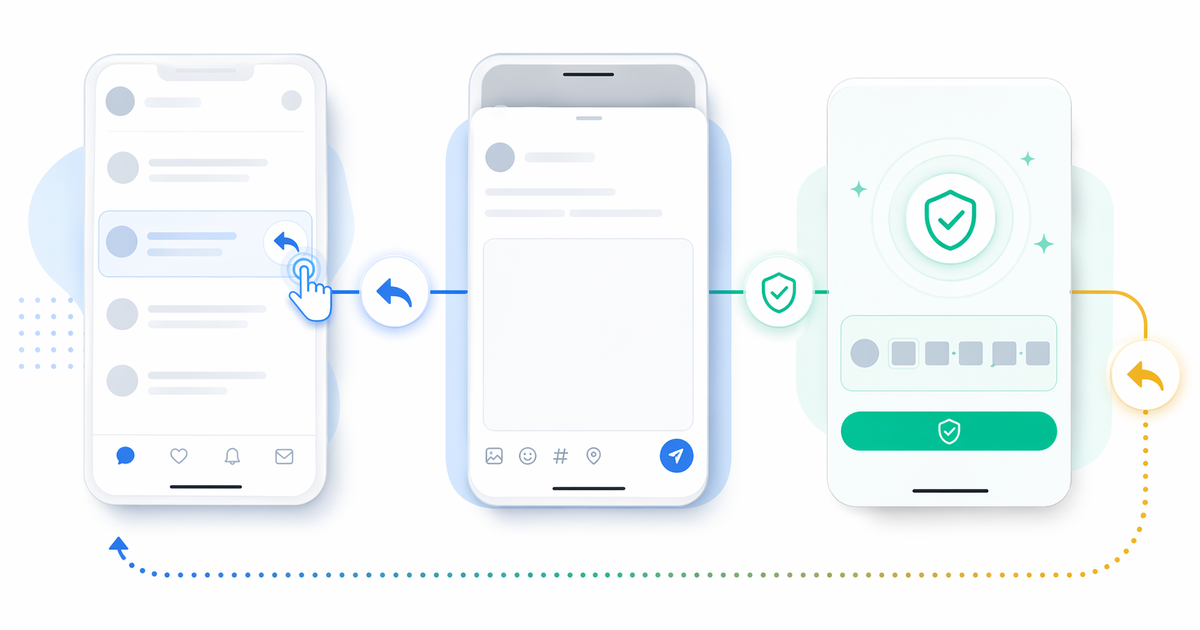
ThreadMaster now supports posting replies to 4chan from iPhone. If you already use ThreadMaster to read 4chan threads, you can continue the flow and reply without switching to Safari.
This guide explains the practical flow: what you need before posting, how to start a reply, what happens when CAPTCHA appears, and why using a forum browser can be more comfortable than moving between multiple apps.
Download ThreadMaster on the App Store
What you need
- ThreadMaster installed on your iPhone or iPad
- A 4chan board added in ThreadMaster
- The latest version of the app
If you only want to browse 4chan first, see the updated guide: How to View 4chan Using ThreadMaster.
Before posting, make sure the thread is still active and that you understand the board rules. 4chan boards can have different expectations around topics, images, spoilers, names, and off-topic replies. ThreadMaster helps with the mobile workflow, but the post still goes through 4chan’s own posting system.
It is also a good idea to update ThreadMaster before trying the feature. Posting support and CAPTCHA handling depend on the newer app flow, so older versions may not include the same behavior.
How to post a reply
- Open a 4chan thread in ThreadMaster.
- Tap the reply or post button from the thread screen.
- Write your message in the in-app composer.
- Add a name or email value if you need one.
- Submit the post.
When 4chan requires CAPTCHA, ThreadMaster opens a focused WebView step so you can solve CAPTCHA and complete the post.
The main benefit is that you can start from the thread you are already reading. You do not need to copy the thread URL, open Safari, search for the reply form, and paste your text again. The app keeps the reply action close to the reading screen.
If you are replying to a fast-moving thread, this saves time and reduces mistakes. You can check the context, write the reply, and continue through the required web step without losing track of where the discussion was.
CAPTCHA handoff
4chan frequently requires CAPTCHA before accepting a post. ThreadMaster keeps this process connected to your draft by carrying your post fields into the WebView step.
That means you can write in the native iOS composer first, handle CAPTCHA when needed, and then return to reading the thread. The app does not try to hide the fact that 4chan controls the final posting step. Instead, it makes the transition less disruptive.
CAPTCHA is often the part of mobile posting that feels the most awkward. If you need to switch to a browser at that point, you may lose your draft or need to find the same thread again. ThreadMaster’s focused WebView keeps the process closer to the original reply flow.
If 4chan asks for additional confirmation, rejects the post, or shows an error, follow the message shown in the WebView. The posting rules and rate limits still come from 4chan.
Why use ThreadMaster for 4chan posting
- You can read and reply from one app.
- You avoid repeatedly copying text between apps.
- You keep your context while following active threads.
- You can use the same app for 4chan and other forums.
For many users, the biggest reason is context. On desktop, switching tabs is easy. On iPhone, switching between a reader, Safari, and notes can make a quick reply feel like a chore. Keeping the composer inside the reader makes the workflow more natural.
ThreadMaster is also useful if you read more than 4chan. The app supports multiple forum types, so you can keep favorites, history, search, and thread reading in one place. If you move between 5ch, Bakusai, 4chan, and other boards, that consistency matters.
The feature is not meant to change how 4chan works. It simply gives iPhone users a smoother way to move from reading to replying while still completing the required web-based verification step.
Tips before you submit
Read the last few replies before posting, especially in fast threads. Someone may have already answered the same point, or the topic may have shifted.
Keep your post short enough to review before CAPTCHA. Mobile typing can introduce mistakes, so it is worth checking names, links, and formatting before you continue.
If you plan to include a name, email, or other optional field, fill it in deliberately. ThreadMaster can help carry fields into the posting flow, but you should still confirm the final contents before submitting.
Related update
For a broader announcement of this feature, read ThreadMaster for iOS Now Supports Posting to 4chan.
Try it
Update ThreadMaster, open your usual 4chan board, and try replying from inside the app. Start with a simple reply so you can understand the composer and CAPTCHA handoff flow.
Once you are comfortable with the process, ThreadMaster can become a practical way to browse and participate in 4chan threads from iPhone without repeatedly switching to Safari.